How push notifications actually work on Android and iOS
A clear walkthrough of the push pipeline, tokens, FCM, APNs, and what happens between your server calling send and a notification appearing.
Push notifications look simple from the outside: your server decides to send something, and a banner appears on a phone. The path between those two moments involves several parties, and understanding it explains most of the problems teams hit.
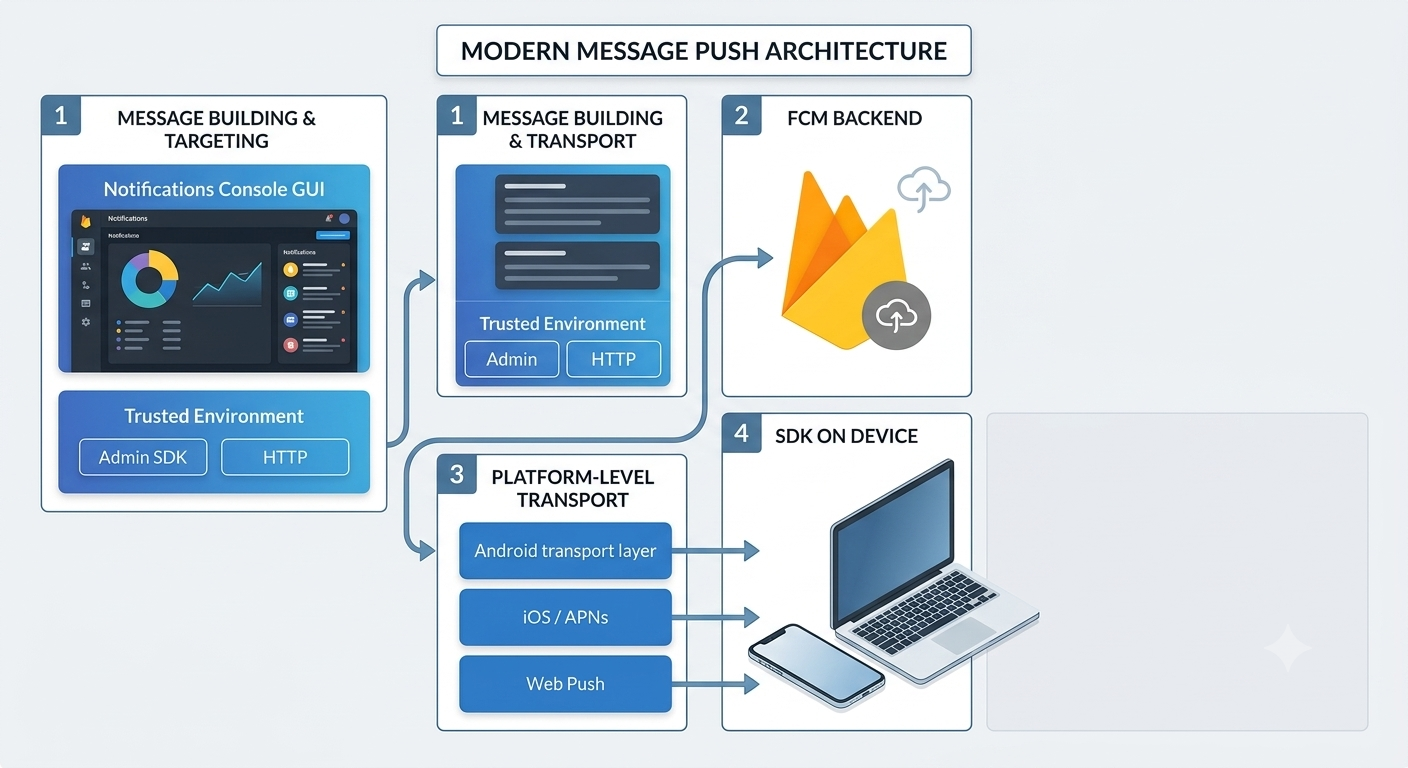
The four participants
- Your app, which asks the operating system for permission and receives a device token.
- The platform push service, APNs for Apple, FCM for Google.
- Your server, which decides what to send and to whom.
- The device, which is often asleep, offline, or both.
Nobody sends a notification directly to a phone. You hand a message to the platform service, and it delivers when it can.
Tokens are the address
When your app registers for push, the operating system returns a token: an opaque string identifying that app install on that device. Not that user, that install.
This distinction causes real bugs:
- Reinstalling the app produces a new token.
- Restoring a backup to a new device can produce a new token.
- One user with two devices has two tokens.
- Tokens expire, and can be revoked without warning.
So your backend needs to map tokens to users as a many-to-one relationship, and to remove tokens the platform reports as dead. A system that never prunes accumulates addresses that will never deliver, and every send quietly wastes work on them.
FCM, APNs, and the relay
Android delivery goes through Firebase Cloud Messaging. iOS delivery goes through Apple Push Notification service.
You can talk to APNs directly, but FCM can relay to it, you upload an APNs key to your Firebase project once, and then send everything through FCM. That is one credential to manage instead of two, which is why most cross-platform setups do it that way.
Delivery is best-effort
This is the part that surprises people: push is not guaranteed. The platform services explicitly do not promise delivery. A notification may be delayed, coalesced with another, or dropped entirely if the device is offline long enough.
Practical consequences:
- Never use push as the only way a user learns something important.
- Do not treat a successful send response as proof of receipt. It means the platform accepted the message.
- Design for duplicates. A user may see the same nudge twice if your system retries carelessly.
Data payloads and deep links
A push carries two useful parts: the visible notification, and a data payload your app can read when the notification is opened.
The data payload is how a notification knows where to go. Rather than dumping the user on your home screen, you carry a route, a screen and some parameters, and your app's own navigation handles it.
One caution: if several push SDKs are installed in the same app, every one of them sees every incoming push. Namespacing your data keys, and ignoring payloads that are not yours, is what keeps them from fighting.
Where Retainza fits
Retainza sends push through your Firebase project rather than one it owns. You connect a service account, and Retainza batches sends, prunes tokens that FCM reports as unregistered, and carries a structured route so your onNavigate handler can send the user to the right screen.
Because the credential is yours, your delivery quota and your sending reputation stay yours.