Ask for push permission once and make the answer stick
Most apps burn the system prompt on day zero. Soft-ask first, ask when the value is clear, and plan for “Don’t Allow” so the channel is not dead forever.
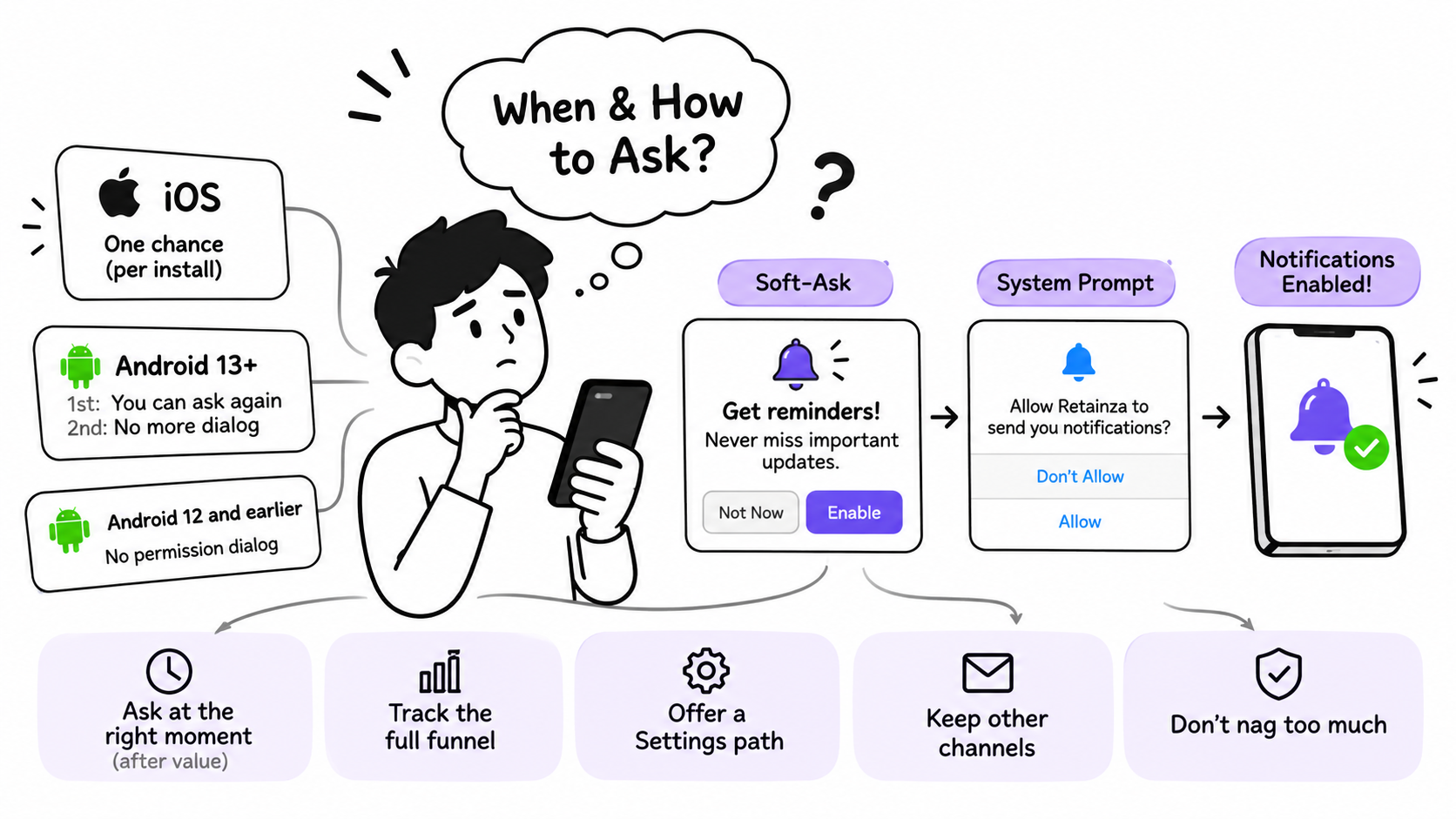
The system permission dialog gives you very few chances. iOS shows it once per install. Android 13 and later stops showing it after a second denial. Ask too early, or with no context, and you can spend those chances before the user has seen any reason to say yes. After that, the way back is the device Settings screen.
Permission UX is not a polish detail. It decides whether visible push exists for that user at all.
What the OS actually does
Your app requests notification permission, the operating system shows its own prompt, and the user answers. What happens next depends on the platform.
iOS prompts the first time you ask. Later requests do not show the dialog again, whatever the answer was. Android 13 and later treats notifications as a runtime permission. For apps that target Android 13 or later, you can ask again after one Don't Allow. After a second one, the dialog stops appearing. Swiping the dialog away does not count as a denial. Android 12 and earlier has no notification permission dialog. Notifications are on unless the user turns them off in Settings. iOS also offers provisional permission. It needs no prompt, and notifications arrive quietly in Notification Center until the user decides to keep them or turn them off.
Permission is also not the same thing as a device token. A user who denied notifications can still have a valid token, and a push sent to it will not be shown. "Has a token" and "can be reached" are two separate facts, and you need to track both.
So the job is not "show the prompt as soon as possible." The job is "earn a Yes the first time," and "have a plan when the answer is No."
Why day-zero prompts fail
Many apps request permission on first launch, before the user has done anything valuable. From their point of view the ask is "Can we interrupt you later?" with no reason attached.
Common failure patterns:
Prompting on the splash screen or an empty home screen. Prompting before signup or the first success moment. A soft-ask that is just a second button into the system dialog, with no explanation. Asking again every session after a denial, which trains people to ignore you. If push is how you deliver trial reminders, streaks, or cart saves, burning the prompt on day zero is expensive.
Soft-ask vs system prompt
A soft-ask is your own UI: a sheet, card, or modal that explains what you will send and why it helps. It has two actions, "Not now" and "Enable notifications." Only the second should call the OS permission API.
A good soft-ask:
- Names a concrete benefit ("Get a reminder the day before your trial ends").
- Sets expectations you actually enforce ("A few messages a week, never overnight").
- Lets people decline without shame.
- Fires the system prompt only after they opt in to that explanation.
The system prompt is for confirmation. Your UI is for clarity. Do not swap those roles.
When to ask
Ask when the benefit is already visible in the product, not when you hope it will be.
Strong moments:
The user finishes onboarding and lands on a goal they care about. The user sets a reminder, streak, or alert inside the app. The user completes a first valuable action, such as a first workout, order, or project. The user leaves a flow where a follow-up clearly helps, such as a trial start or a confirmed booking. Weak moments:
A cold open with no context. Right after a hard paywall rejection. The middle of a task that needs focus. If you cannot finish the sentence "You should allow notifications because...", you are not ready to ask.
Recovering after Don't Allow
Don't Allow is not the end of the relationship. It is the end of the easy path.
- Check the status. Read the OS permission on launch and before any "Enable notifications" button. It can change in Settings at any time.
- Know whether you can still ask. On iOS, a denial means the dialog will not come back. On Android 13 and later you may have one request left, so save it for a moment with a clear reason.
- Offer a Settings path. One clear button, "Open Settings," linked to your app's notification settings where the platform allows it.
- Re-explain value in context. When someone reaches a feature that depends on push, show how enabling it helps that action.
- Cap the nag. One thoughtful reminder beats five banners a week.
- Keep other channels. Email and in-app still work. Never make push the only way someone learns something important.
What to measure
Track the whole funnel, not only the opt-in rate:
Soft-ask shown, soft-ask accepted, system Allow. Soft-ask dismissed or deferred. System Don't Allow. Permission enabled later through Settings. Completion of push-dependent features, for opted-in and denied users. A high day-zero Allow rate with low engagement later can still mean you asked too early. Compare both numbers before you call the prompt a success.
Where Retainza fits
Retainza does not decide when the OS dialog appears. Your app does, because that moment is a product decision.
Retainza handles what surrounds it. An in-app message triggered by an event can explain the benefit, and its button can route to the screen where your app makes the request. Report the answer with setPushPermission and you can segment on it, so people who denied push can be reached by email or in-app instead.
When you do send, push goes through your Firebase project, tokens that FCM reports as unregistered are pruned, and the quiet hours and frequency caps you set are applied at send time.
Permission UX decides who can be reached. Campaign design decides whether they stay reachable.